RagLeap
Open source · Self-hosted · MIT licensed

AI employees that ask before they act.

RagLeap is a free platform for building AI employees — agents that learn from your business documents and talk to your customers on WhatsApp, Telegram, Discord, and voice. By default they take no action on their own. In approval mode, every real action waits for your yes first; full autonomy is opt-in.

# checks Docker, clones the repo, creates your .env
$ curl -fsSL https://raw.githubusercontent.com/antonyrag/ragleap-core/main/install.sh | bash

# asks which AI to use (Gemini, local Ollama or skip), generates your keys and starts the stack
# manage it afterwards with: ragleap launch, stop, status, logs, update, key
$ git clone https://github.com/antonyrag/ragleap-core.git
$ cd ragleap-core
$ cp .env.example .env   # add GEMINI_API_KEY (embeddings use Gemini by default); chat model via LLM_PROVIDER
$ docker compose up --build -d
Run it on a cluster with the Helm chart and manifests in ragleap-ops, live-tested on a kind cluster. Kubernetes guide →
What we are

One sentence, no fine print

RagLeap is open-source software you run on your own server. It is not a SaaS product, there is no RagLeap account, and no RagLeap-hosted database — your data is stored on infrastructure you control, and text is sent only to the AI providers you configure: your chat model and your embedding provider (Gemini by default).

What it does

Turns your documents — PDFs, policies, catalogs, FAQs — into AI employees that can answer questions accurately, hold a conversation across chat and voice channels, and optionally take real actions like sending an email or logging a task.

What it doesn't do

It doesn't act without permission. It doesn't browse the open web or run shell commands by default. It doesn't lock you into one AI provider, one vector database, or one deployment target.

The RagLeap Office

A staff of AI employees, not one chatbot

Instead of a single assistant that tries to do everything, RagLeap ships with 46 pre-built roles — each with its own guardrails, memory, and skill tags — plus the tools to define your own. Route a request to the right one directly, or let a supervisor model pick for you.

SOME OF THE 46 BUILT-IN ROLES
Manager Sales Support Marketing Finance Legal Intake HR Recruiter Inventory Scheduler Data Analyst + 35 more, or build your own
New in v0.9.0: the AI Office dashboard at /office, with an overview, approvals, employees by department, a task board, agent runs, an activity log and settings. It is reachable locally or through an SSH tunnel, by design.
Why not just use…

Not another agent framework

OpenClaw

A personal, always-on agent — broad reach across shell, browser and channels, built for one person's own machine. No concept of a business owner approving what it's allowed to do.

Paperclip

An orchestration layer that sits above agents like OpenClaw — org charts, budgets, governance. Closer to a management console than to a set of employees who actually do the work.

RagLeap

AI employees that already know your business — your documents, your policies — and a rule underneath every one of them: by default, anything that reaches outside a chat reply waits for you to approve it first. Full autonomy is an explicit opt-in, and sensitive roles can never run fully autonomously.

How it works

Every action passes through one gate

A chat reply is free. Anything that sends an email, posts to Slack, calls a webhook, or changes a setting is not — it stops here first, every time.

Employee proposes

One action, from what you've configured — never a destination it invents itself.

Owner is asked

A message goes to the exact channel and contact you set as the approver.

YES or NO

Checked against that one configured owner — a reply from anyone else changes nothing.

Runs, or doesn't

Only on YES. Every step is logged either way.

01

Sensitive roles can't opt out

Legal, medical, tax and compliance-flavored employees are permanently held to semi-automatic or fully manual mode — including any role you create yourself.

02

Every call is metered

A usage ledger records every LLM call an employee makes, with optional daily and monthly token caps — per employee or across the whole deployment.

03

Webhooks verify who's really talking

Platform signatures are checked on every inbound message; an unsigned request is rejected rather than silently trusted.

Under the hood

What's actually in the repo

Reasoning that shows its work

Optional chain-of-thought and tree-of-thought modes, plus a self-correction pass that checks an answer against your documents before it's sent.

A supervisor that routes for you

Send a request to the office as a whole — a supervisor model picks the right employee, or splits it across a small team and merges the results.

Bring your own model

19 chat providers, including Gemini, Anthropic, OpenAI, Groq, Mistral and DeepSeek, local models through Ollama, and any OpenAI-compatible endpoint. You can set up a fallback chain for when a provider is down or rate-limited.

Six vector backends

pgvector by default, or swap in FAISS, Pinecone, Weaviate, Qdrant or Milvus without changing how you call it.

Talks where your customers already are

WhatsApp, Telegram, Discord, and voice calls (Twilio, real-time transcription and speech), plus an n8n workflow integration.

Contributor-ready by design

Automated guard tests catch a half-added role before it ships unguarded, and a CONTRIBUTING guide walks through adding a new employee.

Roadmap

Shipped, in progress, and next

Every item below reflects the real state of the repo, not a projection. See the latest release notes for exact PR references.

Shipped

All 9 agentic patterns — reasoning, reflection, routing, sub-agents, memory, tools
Approval-gated actions — webhook, Slack, email senders
Usage ledger + token budgets — global and per-role caps
Runtime role safety — auto-detected sensitive roles
Optional API-key auth — global middleware, off by default
AI Office dashboard — overview, approvals, employees by department, task board, agent runs, activity and settings (v0.9.0)
Agents — act-observe loop, sandboxed code and shell, read-only page fetch, MCP client (v0.9.0)
Task tickets and scheduled triggers — cron and time zones (v0.9.0)
Approval inbox — approve or reject in the dashboard or over the API (v0.9.0)
Pluggable embedding providers — Ollama, OpenAI, Mistral and more (v0.9.0)
Installer and ragleap command — keys generated for you (v0.9.0)

In progress

Installer verification — tested offline; a real clean-machine run is still to do

Not built yet

Public access and login throttling — the dashboard is local or SSH-tunnel only for now
An interactive browser — agents can fetch pages read-only today
More channels — WhatsApp, Telegram, Discord and voice exist today
Community

Built in the open

Every contributor is pulled live from GitHub — including community fixes like improved short-query language detection. Open an issue before a large change; the project deliberately stays narrow in scope.

View all contributors
Grid of GitHub avatars of everyone who has contributed to antonyrag/ragleap-core
In the wild

What people say about RagLeap

Two public LinkedIn posts from people outside the maintainer team. We link to the originals so you can read them yourself.

Dragan Petkovic

AI Solution Builder and Full-Stack Developer

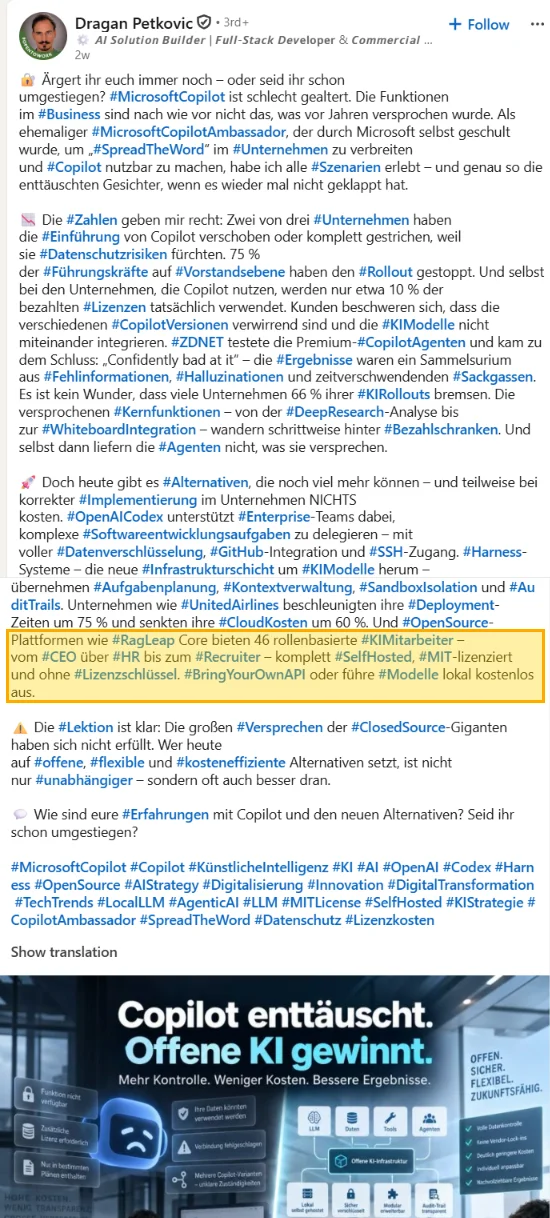
In a German-language post he names RagLeap Core among open-source alternatives, describing it as offering 46 role-based AI employees, self-hosted, MIT-licensed and with no license key. Full write-up: RagLeap Core: 46 built-in AI employee roles.

Show the post (our highlight on the RagLeap lines) Screenshot of Dragan Petkovic's LinkedIn post with the lines about RagLeap Core highlighted

Highlighted by us. RagLeap does not vouch for the other claims in this post.

View on LinkedIn

Hardik Anand

AI Intern at Gigin.ai

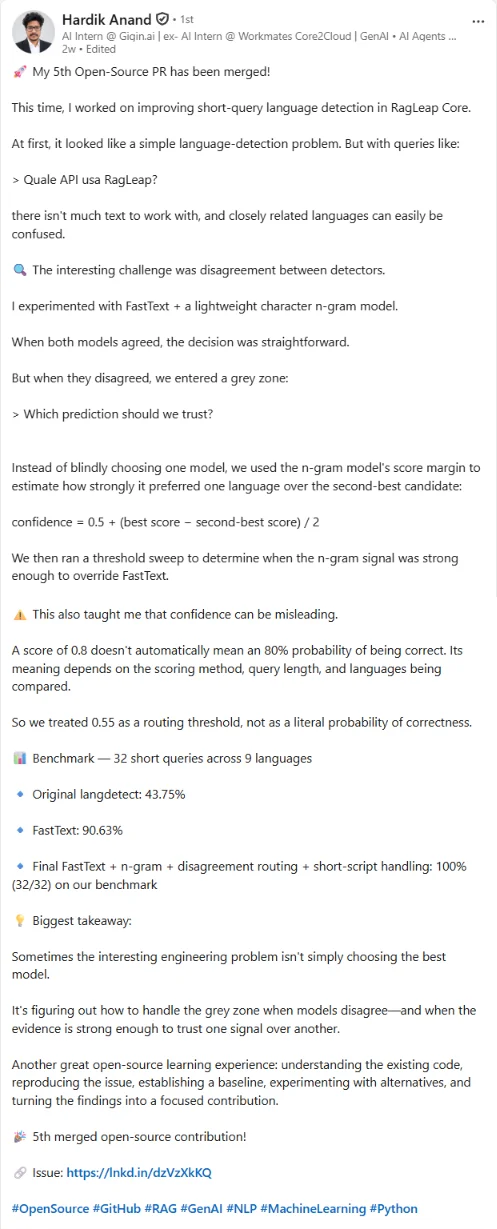
He describes his fifth merged open-source pull request as improving short-query language detection in RagLeap Core (PR #452). On his own benchmark of 32 short queries across 9 languages he reports langdetect at 43.75%, FastText at 90.63% and the final combined approach at 32 of 32.

Those are his figures on his benchmark, not a general accuracy claim for RagLeap. See his contributor page. Full write-up: how RagLeap detects the language of very short queries.

Show the post Screenshot of Hardik Anand's LinkedIn post about improving short-query language detection in RagLeap Core
View on LinkedIn

Read the full write-up: How RagLeap detects the language of very short queries. It covers Hardik's work in detail and mentions both posts.

FAQ

Common questions

Is RagLeap free to use?

Yes. It's MIT licensed and free to self-host. You pay only for the AI provider keys you use. Chat can run on a local Ollama model. Embeddings use Gemini by default (Google AI Studio issues free keys) and can be switched to Ollama, OpenAI, Mistral and other providers with EMBEDDING_PROVIDER.

Can it take real actions on its own?

By default, only with your approval. It can propose one action from tools you've configured, and in approval mode nothing runs until you reply YES from the exact channel and contact you set as the approver. Full autonomy is an explicit opt-in, and sensitive roles can never run fully autonomously.

Is this a cloud service?

No. There's no RagLeap account and no RagLeap-hosted database. It runs on your own server via Docker Compose.

What if I want to build my own AI employee role?

Add one through the API at runtime, or contribute a built-in role — both paths are covered in the CONTRIBUTING guide, and a guard test stops a half-configured role from shipping without safety checks.

Which AI providers are supported?

19 chat providers, including Gemini, Anthropic, OpenAI, Groq, Mistral and DeepSeek, local models through Ollama, and any OpenAI-compatible endpoint. Embeddings use Gemini by default and can be switched to Ollama, OpenAI, Mistral and other providers. You can configure a fallback chain between providers.

Get started

Three steps to a running stack

1

Clone and create your .env

git clone https://github.com/antonyrag/ragleap-core.git
cd ragleap-core && cp .env.example .env
2

Add your keys and start

Put your GEMINI_API_KEY in .env (embeddings use Gemini by default; set EMBEDDING_PROVIDER to use another provider). Pick the chat model with LLM_PROVIDER: 19 options including Anthropic, OpenAI, local Ollama, or any OpenAI-compatible endpoint. Then run docker compose up --build -d.

3

Upload a document, ask a question

The app runs at localhost:8000. Ingest a file, then chat with any of the built-in employee roles.